Equalizer MODBUS Reday - Dynamic charging module - WiFi & Radio Frequency
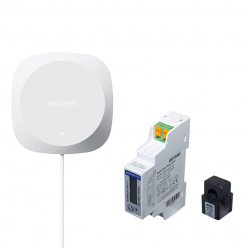
The Equalizer Modbus Ready from the EASEE brand allows you to measure all electrical consumption and dynamically control the charging power of the terminal.
The Modbus Ready Equalizer is a versatile set designed to load balance using third-party electricity meters (see list of compatible electricity meters). This kit includes an Equalizer (P1) and a Modbus cable (E02-QPMBC). A 24 VDC power supply and an electricity meter equipped with one or more current sensors are required.
Required components
The Equalizer Modbus Ready kit includes the Equalizer (P1) and a Modbus cable (E02-QPMBC). You will also need the following:
- A 24 V DC power supply to power the Equalizer (100 mA). This power supply can also be used for the electric meter if necessary. If your electricity meter has a 24V DC output, it can often replace an additional power supply.
- An electric meter compatible with the Equalizer.
For some electric meters, additional CT clamps or Rogowski coils may be required. These components must be compatible with the chosen electricity meter and may require additional configuration to adjust the current sensor rating.
The main functions of the Equalizer:
- Charge as quickly as possible avoiding tripping of the main circuit breaker
- Automatically adapts charging power
Thanks to the Equalizer:
- Recharge up to 6 times faster
- Activate energy sharing to charge several vehicles simultaneously
- Save money by avoiding changing subscriptions
Here is a list of electricity meters that are supported by the Equalizer:
| Electric meter |
Wiring diagram |
Installation manual |
| Micromatic CVM E3 MINI |
400V_TN 230V_IT |
PDF |
| Janitza UMG604PRO |
JPG |
PDF |
| Accu Energy EV390 |
JPG |
PDF |
| Conto D4 IME |
JPG |
PDF |
| Eastron SDM630 |
JPG |
PDF |
| Eastron SDM72D-M |
JPG |
PDF |
| WAGO 879-30X0 |
JPG |
PDF |
| Schneider PM3250 |
JPG |
PDF |
| Carlo Gavazzi EM1XX, EM2XX and EM3XX series |
|
|
Installation:
This guide presents a general workflow and may include more steps than necessary for your energy meter. It is essential to consult the manufacturer's manual to understand the safety and technical specifications of the product.
Important information:
This product must be installed, repaired or maintained only by a licensed electrician. All local, regional and national regulations relating to electrical installation must be followed.
General installation guide:
- 1. Mount the energy meter and power supply (24 VDC) on a DIN rail in the electrical panel. The power supply provides 24 V DC operating current to the Equalizer and energy meter (not all meters require an external power supply).
- 2. Connect the terminals for 230 V operating current to the energy meter and the power supply (24 V DC). We recommend using a separate 10A fuse.
- 3. Connect the 24 V DC current from the power supply to the V+ and V- terminals of the Modbus cable.
- 4. Connect the phase and neutral conductors to the energy meter terminals for voltage measurement. Some meters also require the protective conductor (PE) to be connected.
- 5. Connect the current sensor wires to the energy meter.
- 6. Attach a current sensor around each conductor, either upstream or downstream of the main fuse in the electrical panel. Make sure the sensors are connected correctly, the arrow marked on the sensor should point towards the load.
- 7. Connect the RS485 communication ports of the energy meter to terminals A and B of the Modbus cable. It is important that the shield of the communication cable is connected to terminal G of the Modbus cable.
Energy meter configuration:
- 1. configure the current sensor value
- 2. Configure the network system (TN, IT, single phase, three phase, etc.).
-
Equalizer configuration:
1. Access current sites or update an existing site and select the site.
2. In the site structure, select Add Equalizer.
- 3. Enter WiFi information. The Equalizer and the main charger must be connected to the same WiFi network. This also applies to multiple charging circuits.
- 4. Hold the front of the Equalizer against your cell phone to transmit WiFi details. The Equalizer cannot receive information if the RJ12 cable is connected.
- 5. Connect the Equalizer to the Modbus cable.
- 6. Go to Site Settings, then Equalizer. From there, select the meter type and choose the meter used in your system.
- 7. For installations with multiple circuits, we strongly recommend setting an upper limit value for the entire charging site (eMobility fuse).
To enter this value, start with Site Settings, then tap Equalizer, then Maximum Allocated Current.





 Easy installation
  compatible avec une liste de compteur
  3 phases
  Compatible with EASEE One & Charge
  03 67 10 41 41
  Send an email

 Delivery 48H